MICROSOFT 365 PROTECTION
Your Microsoft 365 is not a backup.
Protect mail, calendar, contacts, OneDrive and SharePoint. Restore in minutes what someone deleted, ransomware encrypted or an employee took with them when they left.
Three ways to lose data Microsoft will not give back
Service availability is not the same as data recovery.
Accidental deletion
A user empties a shared folder and the recycle bin expires before anyone notices.
Ransomware
Encryption reaches OneDrive and SharePoint. You need a clean version, not just an active service.
Staff departure
When an account is disabled, its mailbox and OneDrive are no longer available to the company.
What it protects
An independent copy, with retention and restore designed for recovery.
Exchange mail
Messages, folders and attachments in every mailbox.
Calendar
Personal and shared events and calendars.
Contacts
Contacts and contact folders.
OneDrive
Personal files and versions for every user.
SharePoint
Document libraries and company sites.
Teams files
Channel files are backed up through SharePoint and OneDrive; Teams chats are not.
How it works
Connect your tenant
Authorise the app in Entra ID and choose which companies and mailboxes to protect.
Define the policy
Scope, frequency, retention and storage quota per company.
Incremental backup
Only changes are stored, with hash deduplication and independent storage.
Restore and verify
Item, folder or entire mailbox, plus a real test that what was stored can be recovered.
Inside the product
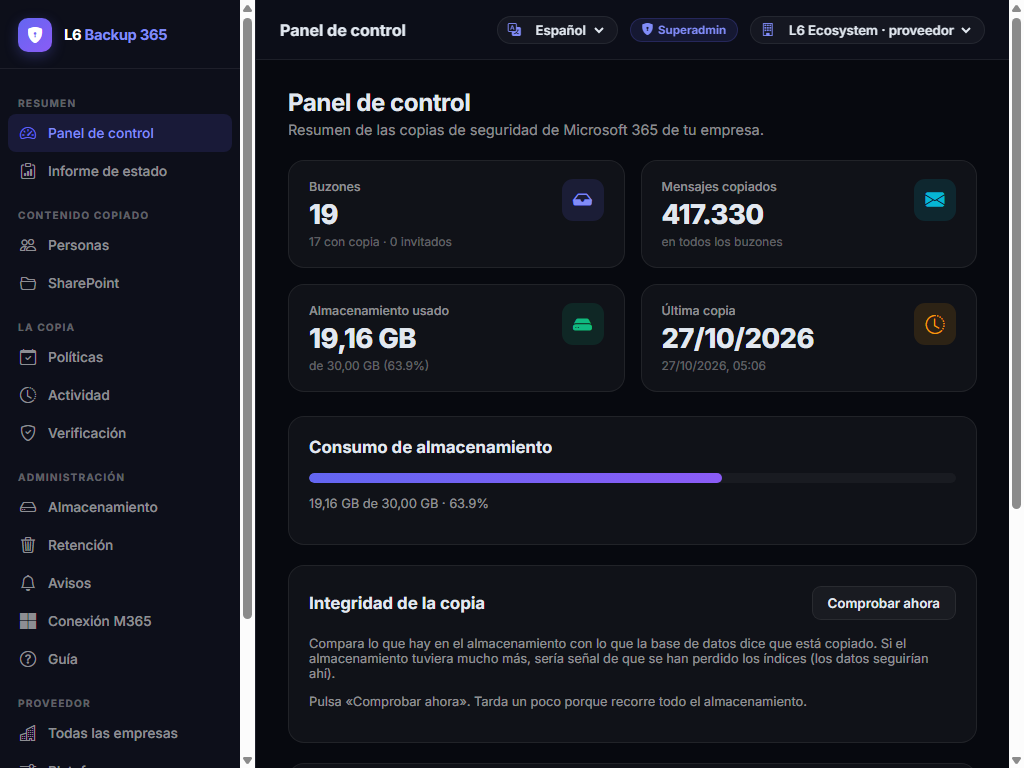
Real screenshots of the L6 Backup 365 panel, using demo data.
Product view
The whole tenant, in one view
Mailboxes, messages, storage and last backup in the same panel. No spreadsheets or emails asking whether the backup ran.
- Protected and pending mailboxes
- Usage against quota
- Latest runs with status
What it connects to
Backup 365 fits into the platform without changing how the client works.
Adder IdP
SSO, companies and platform roles.
ExploreMicrosoft 365
Microsoft Graph connection with admin consent.
Provider panel
Client portfolio, quotas and backup status per company.
ExploreTHE PROOF
We do not sell “there is a backup”; we prove it can be restored.
Hash verification and a full restore of a real message are part of the product. If it cannot be recovered, it is not a backup: it is a file taking up space.
What buyers ask first
Does this replace Microsoft 365?
No. Microsoft 365 remains your mail, files and collaboration. Backup 365 adds an independent copy to recover data when native retention is not enough.
What permissions does it need?
Read permissions to back up and write permissions to restore mail, calendar and contacts. OneDrive and SharePoint add Sites permissions. Consent is granted in Entra ID.
Where is the backup stored?
In S3-compatible storage independent from the client tenant, with configurable encryption and retention. Production uses Backblaze B2.
Does it back up Teams chats?
No. It backs up channel files, which live in SharePoint and OneDrive. Teams chat messages are not in the current scope.
Can I restore an entire mailbox?
Yes. You can restore an item, a folder or an entire mailbox, either to its original location or to a new folder for review first.